
ChatGPT
Work with your real files and terminal from ChatGPT.
Directory review pending — connect now via custom MCP.
One chat, every machine — from your desk or your phone.
npx --registry=https://gitlab.com/api/v4/projects/88458751/packages/npm/ local-commander-agent@latest On Windows. For macOS or Linux, see step 1 below.
As of (update overdue). See usage statistics
Listed in its marketplace or not — any AI app with remote MCP and OAuth support can connect. Setup takes a couple of minutes.
Local Commander is the connection, not the AI. Use the model you like today and switch tomorrow — your computers stay connected.
Platforms with a published setup route
Work with your real files and terminal from ChatGPT.
Directory review pending — connect now via custom MCP.
Reach your computer from claude.ai or the Claude app.
Directory review pending — connect now via custom MCP.
Agents on the same computer can connect directly.
Open WebUI, OpenHands, LangChain, or a client we haven't listed yet. Add https://localcmd.app/mcp as a remote MCP server and sign in with your Local Commander account. The client needs remote MCP and OAuth support.
Give each computer its own job. Get the answers in the AI chat you already use.
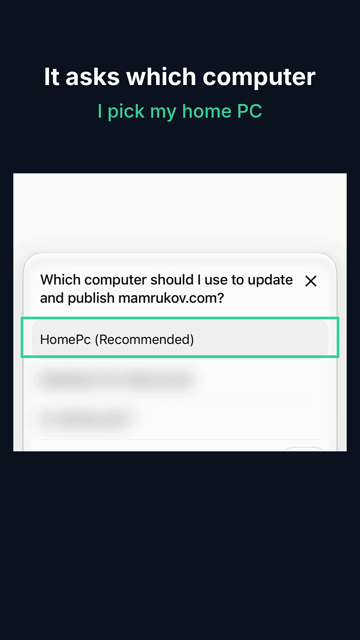
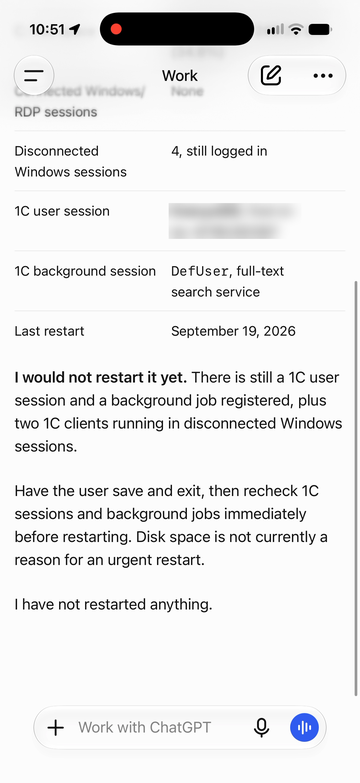
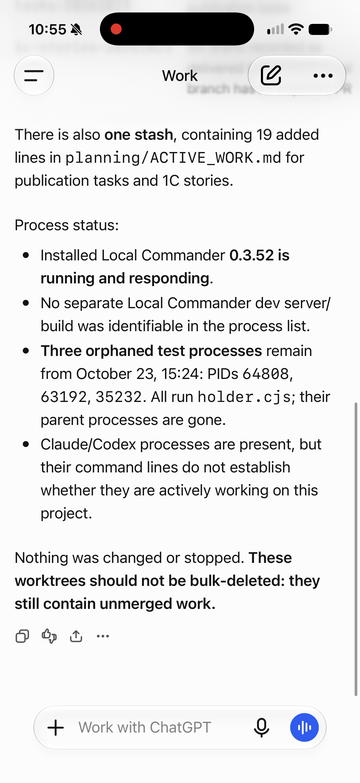
Unedited answers. Waiting is sped up; a user name and other computer names are blurred.
“Practical, powerful, and genuinely useful in our daily development workflow. We’re building SKASC Cloud with it.”
Every request your AI sends through localcmd.app shows which computer ran it and how it ended: done, failed or unknown.
Independent tasks run side by side. Work on the same folder waits its turn.
If a computer drops mid-task, the work is never re-run on a guess. It waits for you in Needs attention.
Full access to your user account or only the folders you pick. Block commands, revoke a computer or an AI client any time.
Two minutes at the computer. After that, it works for you from wherever you are.
One command on each computer you want to reach. On Windows:
npx --registry=https://gitlab.com/api/v4/projects/88458751/packages/npm/ local-commander-agent@latest macOS (Apple Silicon):
npx --registry=https://gitlab.com/api/v4/projects/88458751/packages/npm/ -p local-commander-agent@latest -p local-commander-agent-darwin-arm64@latest localcommander Linux x64:
npx --registry=https://gitlab.com/api/v4/projects/88458751/packages/npm/ -p local-commander-agent@latest -p local-commander-agent-linux-x64@latest localcommander Linux ARM64:
npx --registry=https://gitlab.com/api/v4/projects/88458751/packages/npm/ -p local-commander-agent@latest -p local-commander-agent-linux-arm64@latest localcommander Confirm in your browser. Full access, or only the folders you pick.
Add localcmd.app/mcp to ChatGPT, Claude or any AI that speaks MCP.
Fix the broken signup button and ship it.
You were on the train. Your code, keys and logins never left your home computer.
Tap a line to copy it.
Same controls on both plans. The only difference is how many computers.
One person, your own computers. Work use included.
5computers
For when five computers are not enough.
15computers
A team, or dozens of machines? Write to us.
*Parallel slots: how many requests can run at once across your computers.
Yes, through a supported AI app or website connected to Local Commander. Send a request while you're a passenger, on a train or on a flight with internet access. The computer you ask to work must be awake, online and running the paired agent.
Your AI can work with notes and files available on the computer you choose. If the information lives in a calendar, email or task service, your AI needs a separate connection to that service or a saved export. Connecting a PC does not automatically connect those accounts.
Yes, with their permission and the agent installed and paired with your Local Commander account. For example, ask your AI to investigate a VPN problem and help with a fix. The computer needs a working internet connection; if it is offline, someone there must reconnect it first.
What you choose at setup: full access to your user account, or only the folders you pick. You can block specific commands and remove access at any time.
Not yet. Your AI works through commands, files and scripts. If a program has a command line, a script or an API — Git, ffmpeg, Blender, Python, a build tool — your AI can run it and read the result. Pressing buttons in a window, such as exporting from Lightroom by hand, is not something it does today. Every action is a command you can see in the log and cancel.
Yes. Ask your AI to cancel the request; Local Commander passes the cancel to that computer. You can also stop Local Commander there. Removing a computer’s access blocks new work, but doesn’t stop work that is already running.
Commands and their results pass through our service to reach your AI. The privacy policy explains what is kept and for how long.
No. Nothing on your computer waits for connections from the internet, and your router stays as it is. Local Commander on your computer connects out over an encrypted line, and only AI apps you signed in with your account can send it work. How it stays yours.
No. Work runs with the permissions of your user account on that computer. For stronger isolation, run the agent under a separate user account.
Windows 11 x64, macOS 14 or later on Apple Silicon, or Linux with a systemd user session (Ubuntu 24.04 x64 or arm64), plus Node.js 20 or later. No Docker, WSL or Git checkout. Tools your projects use, such as Git or Python, are installed separately.
Work, home and a little help for family. One AI chat.
npx --registry=https://gitlab.com/api/v4/projects/88458751/packages/npm/ local-commander-agent@latest On Windows. For macOS or Linux, see step 1 below.
Latest 10 requests across your computers.
A failed request may already be handled in your AI chat.
Add a computer, see which ones are online, and manage the AI apps that can reach them.
Your AI can take a screenshot of a computer's screen when it needs to see it. During the beta it's turned on for each account on request.
An agent identity counts here only when a request is attested: it carries project, task-run, agent-runtime, inference/turn, operation, child-execution and session linkage, with explicit unknown as a first-class value. AI apps and sessions on Computers are connections, not independently identified agents.
From your most recently recorded requests.
Generic MCP-only usage is never shown here as a named agent. Session and project come from Claude Code on computers with Local Commander 0.3.55 or later and from Codex with 0.3.59 or later; tasks need 0.3.58 or later for Claude Code and 0.3.59 for Codex. The AI Analyst is planned, not active yet — see the Analyst preview.
Your Local Commander usage, and model tokens from Claude Code and Codex on computers that report them. Task quality and dollar savings aren’t measured here yet.
Model tokens come from Claude Code and Codex: the token counts they send with your key, or their session files on computers where model token counts are on, from when each started reporting. AI apps in a browser or on a phone, other clients and billing are not measured.
Local output-byte reduction is not a provider invoice. Missing data is shown as unknown, never as zero savings.This page shows your Local Commander usage only, not everything your AI does with other tools.
See what Local Commander observed, which requests have task links, and what remains unknown. No AI analyst response is generated on this page.
The evidence view is available only where enabled. AI-generated analysis and model comparisons are still planned.
Each card is one task your AI worked on, with what it did in everyday words. When your AI does not report where a task ends, the card covers its whole session. Open a card to see each request and its steps; failed ones open with the reason.
Shown for each step: tool, result, time taken and output size. Command text and output are not stored, on any plan.